Session 10: ARI Software Ecosystem & ROS2 Fundamentals
Week: 10 Element: ICTPRG439 Element 2.3 Duration: 4 hours Phase: Software Architecture Analysis
Session Introduction
This session transitions from hardware exploration to software ecosystem analysis of the ARI humanoid robot platform. We explore the software packages, dependencies, and development environment that power ARI's intelligent behaviors, introducing the critical concept of sim-to-real transfer - how code developed in simulation works on real hardware.
We will analyze the PAL Robotics forks repository to understand professional component evaluation strategies and establish foundational knowledge of ROS2 fundamentals through hands-on tutorials.
This bridges your Session 9 packaging knowledge with real-world robotics systems and prepares you for the upcoming GO2 capstone project (Weeks 13-17). Note: the actual GO2 simulator environment setup happens in Session 13 using WSL2; this session focuses on ROS2 concepts you'll apply there.
Learning Objectives
By the end of this session, you will have:
- Analyzed PAL Robotics forks repository and forking strategy using real examples
- Understood professional component evaluation criteria and decision-making
- Completed ROS2 CLI fundamentals using turtlesim tutorials
- Understood the sim-to-real pipeline - foundation for GO2 capstone project (setup happens Week 13)
Session Structure
- PAL Robotics Software Analysis - Repository exploration and forking strategy
- Component Evaluation Framework - Using respeaker_ros as a case study
- Sim-to-Real Concept - How ARI bridges simulation and hardware
- Packaging Ecosystems: Connecting PyPI to ROS2 - How multiple package managers work together
- ROS2 Fundamentals - CLI tools, nodes, and communication concepts
Part 1: PAL Robotics Software Ecosystem
1.1 ARI Robot Hardware Overview
Before analyzing software, let's understand the hardware platform that software controls:
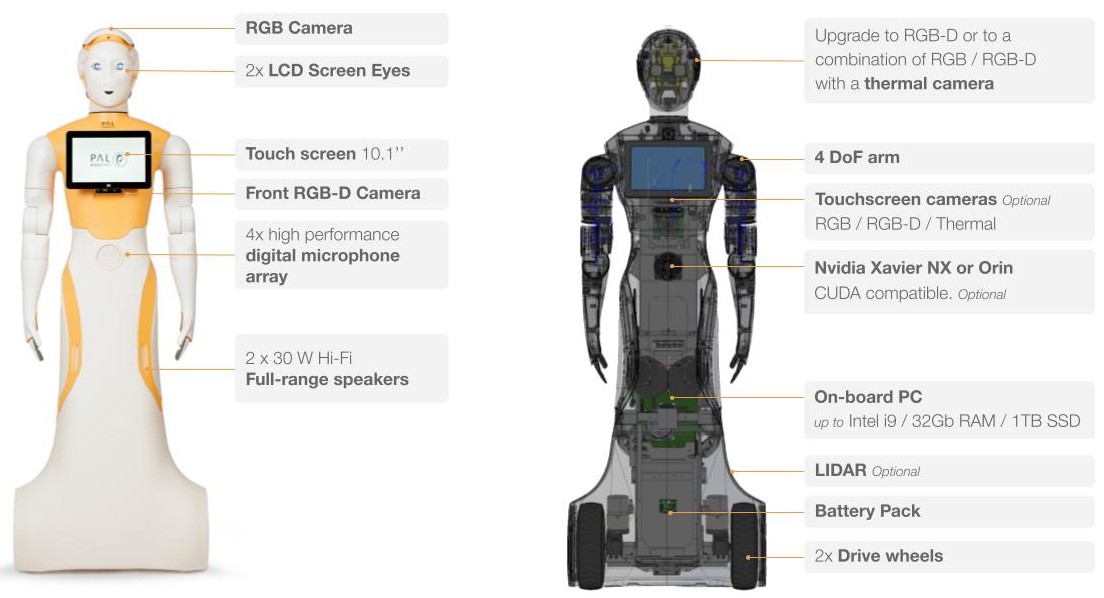
Key ARI Hardware Components:
| External Features | Internal Components |
|---|---|
| RGB Camera (head) | On-board PC (up to Intel i9) |
| 2x LCD Screen Eyes | Nvidia Xavier NX or Orin (optional) |
| Touch screen (10.1") chest | Battery Pack |
| Front RGB-D Camera | 2x Drive wheels |
| 4x Microphone array | LIDAR (optional) |
| 2x Hi-Fi Speakers | 4 DoF arm |
The combination of rich sensors, powerful computing, and ROS2 software enables ARI to perform complex tasks. Understanding this hardware context helps you appreciate why certain software packages exist.
1.2 PAL Robotics Forking Strategy
Explore the PAL Robotics forks repository to understand their professional approach:
Repository URL: https://github.com/pal-robotics-forks
PAL Robotics maintains over 200 forked repositories rather than using upstream packages directly. Let's examine why through a specific example.
Case Study: ReSpeaker ROS Fork
Original: https://github.com/respeaker/respeaker_ros
PAL Fork: https://github.com/pal-robotics-forks/respeaker_ros/tree/816ea97c29aa2894fcf1b96e908ce6f98fd68245
ReSpeaker Microphone Array
ReSpeaker is a 4-microphone array (not a speaker despite the name) used for: - Speech recognition in noisy environments - Sound source localization ("Where did that voice come from?") - Multi-channel audio processing - Wake word detection ("Hey ARI")
Why PAL forked instead of using upstream:
| Issue | PAL's Solution | Business Benefit |
|---|---|---|
| Python 3 compatibility | Updated package for ROS Noetic | Works with modern ROS |
| ARI-specific audio tuning | Custom audio processing parameters | Optimized for ARI's microphone placement |
| Version stability | Locked to specific tested commit | No unexpected breaking changes in production |
| Security patches | Applied without waiting for upstream | Fast security updates for customer deployments |
1.3 Key Package Categories
PAL Robotics maintains forks across these categories:
| Category | Examples | Purpose |
|---|---|---|
| Navigation & Localization | SLAM, path planning | Move autonomously |
| Perception & Vision | OpenCV, point cloud | Understand environment |
| Manipulation & Control | Arm control, grippers | Interact with objects |
| Audio Processing | respeaker_ros, speech recognition | Human-robot interaction |
Part 2: Component Evaluation Framework
Using the respeaker_ros example, let's understand how to evaluate components professionally.
2.1 Evaluation Criteria
When PAL Robotics evaluated the original respeaker_ros package:
✅ Functionality Assessment
- Does it meet requirements? ✓ Provides 4-microphone array access
- Performance acceptable? ✓ Real-time audio processing
- Required features present? ⚠️ Missing ARI-specific tuning
✅ Technical Quality
- Code quality? ✓ Well-structured ROS package
- Documentation? ⚠️ Basic documentation, missing advanced usage
- Testing? ⚠️ Limited automated tests
❌ Maintenance & Support
- Active development? ❌ Last commit >1 year ago
- Community support? ⚠️ Issues not regularly addressed
- Python 3 support? ❌ Still using Python 2
🔄 Strategic Decision: FORK
PAL's evaluation outcome: Fork and maintain internally because:
- Core functionality is solid
- Upstream maintenance is insufficient for production use
- ARI-specific modifications needed
- Can't risk upstream breaking changes
2.2 Component Decision Framework
flowchart TD
    A["🔍 Assess Functionality<br/>Does it solve our problem?"] --> B["✓ Yes"]
    A --> C["✗ No"]
    B --> D["🏗️ Check Quality<br/>Is it well-built?"]
    C --> Avoid1["❌ AVOID<br/>Wrong tool"]
    D --> E["⚙️ Evaluate Support<br/>Is it actively maintained?"]
    E --> F["✓ Active & Well-maintained"]
    E --> G["⚠️ Unmaintained"]
    E --> H["✗ Abandoned"]
    F --> Use["✅ USE UPSTREAM<br/>Well-built, maintained<br/>meets needs exactly"]
    G --> Fork["🔗 FORK<br/>Good code, needs updates<br/>robot-specific tuning"]
    H --> BuildOrFork["🔄 FORK or<br/>BUILD CUSTOM<br/>Core value present but<br/>needs significant work"]
    Avoid1 --> End["DECISION<br/>MADE"]
    Use --> End
    Fork --> End
    BuildOrFork --> End
    H --> Avoid2["❌ AVOID<br/>Too much work needed"]
    Avoid2 --> End

    style Use fill:#90EE90
    style Fork fill:#FFD700
    style BuildOrFork fill:#FFA500
    style Avoid1 fill:#FF6B6B
    style Avoid2 fill:#FF6B6B
Decision outcomes:
- ✅ Use upstream: Well-maintained, meets needs exactly
- 🔗 Fork: Good code, poor maintenance, needs customization
- 🔄 Build custom: No suitable options, highly specialized needs
- ❌ Avoid: Poor quality, incompatible, or unnecessary complexity
Part 3: Sim-to-Real Transfer
One of ARI's greatest strengths is code developed in simulation that works on real hardware. This concept will be crucial for your GO2 capstone project.
Why Sim-to-Real Matters
flowchart TD
    A["✍️ Write Algorithm"] --> B["🎮 Test in Gazebo Sim"]
    B --> C["🤖 Run on Real ARI"]
    C --> D["🚀 Deploy to Field"]

    B --> B_note["⚡ Fast iteration<br/>🛡️ Safe testing<br/>💰 Free!"]
    C --> C_note["✓ Same code<br/>✓ Proven to work"]
    D --> D_note["📦 Production Ready"]

    style A fill:#E3F2FD
    style B fill:#FFF3E0
    style C fill:#F3E5F5
    style D fill:#E8F5E9
    style B_note fill:#FFF9C4,stroke:none
    style C_note fill:#FFF9C4,stroke:none
    style D_note fill:#FFF9C4,stroke:none
How ARI Achieves Sim-to-Real
Key principle: Abstraction through ROS2
Your Code (doesn't care if simulated or real)
         ↓
    ROS2 Topics/Services
    /robot/cmd_vel → move robot
    /robot/joint_states → read positions
         ↓
    Hardware Drivers (handles the difference)
    ├─ Simulation driver: talks to Gazebo
    └─ Real robot driver: talks to actual hardware
The same move() call works in simulation OR on real hardware, because ROS2 abstracts the difference.
ARI Simulation with Gazebo
PAL Robotics provides official simulation support for ARI using Gazebo, an open-source 3D robot simulator. You can launch ARI in simulation with a single command:
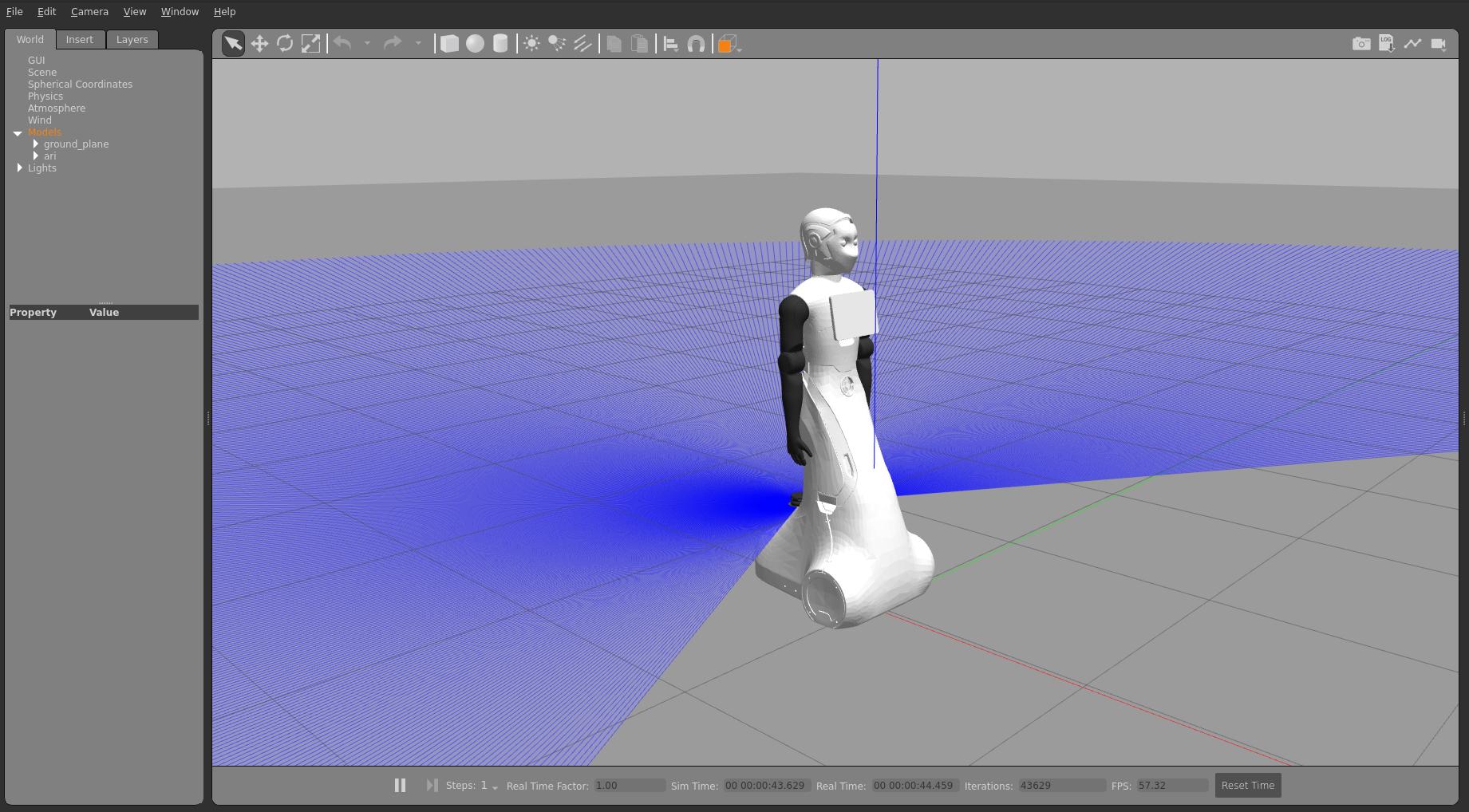
Available simulation environments:
| World | Description | Use Case |
|---|---|---|
| Empty world | Default, no objects | Basic testing, algorithm development |
| Small office | Office environment with furniture | Navigation testing, social scenarios |
| Custom worlds | PAL Gazebo worlds repository | Specialized environments |
Reference: PAL Robotics ARI Simulation Documentation
ARI Simulation in Action
Watch ARI operating in the Gazebo simulation environment:
Notice how the simulated ARI performs the same tasks that would work on the physical robot - this is the power of sim-to-real transfer through ROS2 abstraction.
Connection to GO2 Capstone
This same pattern applies to your upcoming GO2 project:
- Weeks 13-15: Develop GO2Controller in Gazebo simulation
- Week 16: Test integration and prepare for real hardware
- Week 17: Document sim-to-real deployment process
Industrial Sim-to-Real: NVIDIA Isaac Lab
While ARI uses Gazebo for simulation, industrial applications often require more advanced simulation frameworks. NVIDIA Isaac Lab is an open-source, modular training framework for robot learning that enables contact-rich simulation and reinforcement learning at scale.

Key capabilities demonstrated in NVIDIA's work:
| Feature | Description | Benefit |
|---|---|---|
| Zero-shot sim-to-real | Policy trained in simulation deploys directly to real robot without fine-tuning | Reduces development time significantly |
| Domain randomization | Varying robot dynamics (friction, damping) and observation noise during training | Makes policies robust to real-world variation |
| Impedance control | Compliant, soft interactions with objects | Safe contact-rich manipulation |
| Parallel environments | Thousands of simulated robots training simultaneously | Fast policy learning |
Real-world example: NVIDIA demonstrated a gear assembly task on a UR10e industrial robot:
- Trained policies in Isaac Lab using reinforcement learning (PPO algorithm)
- Deployed using NVIDIA Isaac ROS (ROS2-based acceleration)
- Used UR's direct torque control interface for impedance control
- Achieved successful zero-shot transfer to real hardware

Technologies used:
- Isaac Lab - GPU-accelerated simulation and RL training
- Isaac Sim - Physics simulation (Isaac Sim 4.5)
- Isaac ROS - ROS2 packages for perception (Segment Anything, FoundationPose)
- UR10e torque interface - Low-level torque control for impedance control
Why this matters for your education: The techniques used here (domain randomization, impedance control, sim-to-real abstraction) are the same principles that make ARI's simulation work. Understanding this industrial application gives you insight into how professional robotics companies bridge the simulation-to-reality gap.
Reference: Bridging the Sim-to-Real Gap | NVIDIA Developer Blog
Sim-to-Real Best Practices
Whether working with ARI, GO2, or industrial robots, these principles ensure successful sim-to-real transfer:
| Practice | Description | Implementation |
|---|---|---|
| Abstraction layers | Keep business logic separate from hardware | ROS2 topics/services |
| Domain randomization | Train with varied conditions | Randomize friction, lighting, object poses |
| Progressive complexity | Start simple, add complexity | Empty world → office world → custom |
| Testing in simulation | Verify before real hardware | Same interfaces, different drivers |
| Impedance control | Soft, compliant interactions | Critical for contact-rich tasks |
Part 4: Packaging Ecosystems: Connecting PyPI to ROS2
Connecting your Session 9 PyPI knowledge to how package management works in robotics — where multiple ecosystems (pip, apt, colcon, rosdep) work together.
4.1 Standard Python Package Structure
Every professional Python package follows PEP 517 conventions:
my-package/
├── pyproject.toml          # Package metadata & build config
├── README.md               # Project overview
├── LICENSE                  # Open source license
├── src/
│   └── my_package/
│       ├── __init__.py
│       └── module.py
└── tests/
    └── test_module.py
GO2 Capstone Connection
Your go2_wave package (Weeks 14-17) will follow this same structure — as a ROS2 package with package.xml and setup.py. You'll develop it on WSL2 in Week 13 after the simulator is installed, but these Python packaging concepts apply directly.
4.2 PyPI: The Python Package Index
Recall from Session 9:
| Concept | What It Does | Why It Matters |
|---|---|---|
| PyPI | Central repository for Python packages | Anyone can pip install your code |
| Test PyPI | Practice repository | Safe to experiment without affecting real packages |
| Semantic Versioning | major.minor.patch numbering |
Users know what changed between versions |
| pyproject.toml | Package metadata file | Defines name, version, dependencies, author |
| Build tools | python -m build |
Creates distributable .whl and .tar.gz files |
| twine | Upload tool | Publishes packages to PyPI |
4.3 From PyPI to Robotics Packaging
In robotics, you encounter multiple package ecosystems working together:
| Ecosystem | Tool | Repository | What Gets Installed |
|---|---|---|---|
| Python | pip install |
PyPI | Python libraries (numpy, opencv-python) |
| System | apt install |
Ubuntu repos | OS packages, ROS2 core binaries |
| ROS2 | colcon build |
Source (GitHub) | ROS2 packages from source code |
| ROS2 deps | rosdep install |
rosdistro | Resolves cross-ecosystem dependencies |
Why This Matters for GO2
Your GO2 capstone will use all four ecosystems, set up in Week 13:
apt install→ ROS2 Jazzy, Gazebo Harmonic (via WSL2 one-shot script)pip install→ Python dependencies for your controllercolcon build→ Build yourgo2_wavepackage from sourcerosdep install→ Resolve dependencies declared inpackage.xml
4.4 Key Packaging Principles
What you learned in Session 9 applies everywhere:
- Versioning → Tag releases so users know what they're getting
- Dependencies → Declare what your package needs to run
- Documentation → README, docstrings, API docs
- Licensing → Tell users how they can use your code
- Distribution → Make it easy for others to install
Part 5: ROS2 Fundamentals
We'll use ROS2 fundamentals to test our development environment and prepare for the GO2 capstone project.
5.1 Official Tutorial
Follow the official ROS2 tutorial: Beginner: CLI tools Using turtlesim
5.2 Core ROS2 Concepts
| Concept | Purpose | GO2 Application |
|---|---|---|
| Nodes | Independent computation units | go2_controller, camera_driver |
| Topics | Asynchronous message passing | /go2/cmd_vel, /go2/joint_states |
| Services | Synchronous request-response | sit(), stand(), wave() |
| Parameters | Configuration values | wave speed, joint limits |
5.3 Turtlesim Exploration
The tutorial demonstrates concepts you'll apply to GO2:
- ✓ Node launching → Launch GO2 controller
- ✓ Topic publishing → Send movement commands
- ✓ Service calling → Trigger behaviors (sit, wave)
- ✓ Parameter modification → Tune behavior parameters
- ✓ RQT visualization → Monitor robot state
Testing Goal: Verify your development environment works before starting GO2 project.
Check Your Understanding
Q1: Why did PAL Robotics fork respeaker_ros instead of using upstream?
Answer
Upstream was unmaintained (Python 2, old ROS), but core functionality was solid. Forking allowed PAL to add ARI-specific features, ensure Python 3 compatibility, and control version stability for production deployments.
Q2: What are the four main criteria for evaluating a software component?
Answer
- Functionality - Does it solve your problem?
- Quality - Is it well-built and documented?
- Support - Is it actively maintained?
- Strategic fit - Does it align with your project needs?
Q3: How does sim-to-real transfer work in ROS2?
Answer
ROS2 abstracts hardware through topics and services. Your code sends commands to /cmd_vel. In simulation, Gazebo listens. On real hardware, robot drivers listen. Same interface, different implementation.
Q4: How will you apply these concepts in the GO2 capstone project?
Answer
Week 13: Evaluate go2_ros2_sim_py using component criteria. Weeks 14-15: Develop GO2Controller using ROS2 topics/services. Week 16: Test sim-to-real transfer from Gazebo to real GO2.
Session Summary
You've learned:
- Professional component evaluation - Using PAL Robotics' respeaker_ros fork as a case study
- Forking strategies - When and why to fork vs use upstream packages
- Sim-to-real foundations - How ROS2 enables code portability
- Packaging ecosystems - PyPI, apt, colcon, rosdep and how they work together
- Development environment preparation - Docker-based approach for modern robotics
- ROS2 fundamentals - Nodes, topics, services, parameters for GO2 project
Bridge to GO2 Capstone: These skills directly apply to evaluating go2_ros2_sim_py (Week 13) and building your GO2Controller (Weeks 14-17).
Preparation for Next Session
- Complete turtlesim tutorial if not finished in class
- Review component evaluation framework - you'll apply it to GO2 packages
- Familiarize yourself with ROS2 concepts - essential for publisher/subscriber patterns
- Prepare for Week 13 - Next sessions build to the GO2 simulator setup and capstone project
Additional Resources
- ROS2 Jazzy Documentation
- PAL Robotics ARI Tutorials
- Component Evaluation Best Practices - ROS2 package search
- Docker for Robotics
Navigation: ← Week 9 | Learning Plan | Week 11 →