Session 3: Python Fundamentals - Working with Dictionaries
Week: 3 Element: ICTPRG430 Element 3.1 Duration: 4 hours Phase: Programming Fundamentals
Session Overview
This week builds on the testing and debugging skills from Sessions 1 and 2. You'll deepen your understanding of Python's dictionary data structure while implementing a practical shopping cart application with multiple functions working together.
Learning Goals:
- Master dictionary methods and operations (
.get(),.setdefault(),.update(),.items()) - Practice iterating over dictionary keys, values, and items
- Sort and organize dictionary data efficiently
- Work with nested data structures (dictionaries within dictionaries)
- Continue developing test-driven development skills
- Write professional code with clear comments and structure
📊 Lecture Slides
Week 3 Presentation Slides
View the presentation slides for this session:
The slides contain: - Overview of key learning goals - Dictionary basics and use cases - Important dictionary methods explained - Code examples and demonstrations - Practice exercises and Q&A sections
Pre-Session Preparation
IDE & Python Setup
Ensure you have:
- Python 3.8+ installed
- Your preferred IDE: VS Code or PyCharm (both have excellent test runners)
- Basic familiarity with your IDE (opening files, running code)
- Completed Sessions 1 and 2
Dictionary Resources (Optional Pre-Reading)
- Python Official Tutorial: Dictionaries
- Real Python: How to Use Python Dictionaries
- Dictionary Methods Documentation: Built-in dict Methods
Part 1: Understanding Dictionaries
Foundation Lesson (Lecturer-Led Demo):
String Interning Notebook - Open with Visual Studio Code as an interactive notebook (demonstrates Python object model concepts foundational to understanding dictionaries)
This part will be demonstrated live in class using the interactive Jupyter notebook. The lecturer will explain:
Key Concept: Dictionaries Store Key-Value Pairs
In Python, dictionaries store data as key-value pairs, allowing you to access values by their unique keys instead of by position.
Dictionary creation and access:
# Create a dictionary
inventory = {'Banana': 15, 'Apple': 12, 'Orange': 8}

# Access a value by key
print(inventory['Banana'])  # 15

# Add or update an item
inventory['Milk'] = 20

# Check if a key exists
if 'Orange' in inventory:
    print("We have oranges!")
Why This Matters
- Fast lookups - Access values by key in constant time O(1)
- Self-documenting code - Keys make data meaning clear
- Flexible data - Store any type of value (strings, numbers, lists, other dictionaries)
- Real-world modeling - Perfect for inventories, carts, configurations, and more
Important Dictionary Methods
# .get() - Safe access with default value (no KeyError)
cart = {'Apple': 2, 'Banana': 3}
quantity = cart.get('Orange', 0)  # Returns 0 if 'Orange' not found

# .setdefault() - Get value OR set default if missing
cart.setdefault('Orange', 0)  # Adds 'Orange': 0 if not present

# .update() - Merge or update multiple items
cart.update({'Milk': 2, 'Apple': 5})  # Updates Apple, adds Milk

# .items(), .keys(), .values() - Iterate over dictionary
for item, quantity in cart.items():
    print(f"{item}: {quantity}")
In Class
The Dictionary Methods Jupyter Notebook will be used for the live demonstration (available in Resources). You'll see the lecturer: - Create and modify dictionaries safely - Demonstrate common mistakes (KeyError when key doesn't exist) - Show dictionary methods for safe access and updates - Explore efficient iteration over dictionary data - Practice sorting dictionaries by key and value
Pay attention to how dictionary methods prevent errors and make code more readable!
Part 2: Dictionary Operations in Depth
Before implementing the shopping cart exercise, let's learn important dictionary concepts:
Safe Access Methods:
# .get() returns None or a default if key missing
value = my_dict.get('missing_key', 'default')

# .setdefault() returns value AND adds it if missing
value = my_dict.setdefault('new_key', 0)
Merging and Updating:
# .update() adds/overwrites items from another dict
cart1 = {'Apple': 2, 'Banana': 1}
cart1.update({'Apple': 5, 'Orange': 3})  # Apple now 5, Orange added

# Python 3.9+ union operator
combined = cart1 | {'Milk': 2}  # Creates new dict, doesn't modify cart1
cart1 |= {'Milk': 2}  # Updates in place
Iteration and Views:
# Iterate over items (key, value pairs)
for item_name, quantity in cart.items():
    print(f"{item_name}: {quantity}")

# Iterate over keys only
for item_name in cart.keys():
    print(item_name)

# Iterate over values only
for quantity in cart.values():
    print(quantity)

# Sorted iteration (alphabetically by key)
for item_name in sorted(cart.keys()):
    print(f"{item_name}: {cart[item_name]}")

# Reverse order (Python 3.8+)
for item_name in reversed(cart.keys()):
    print(item_name)
Dictionary Creation Shortcuts:
# Create from a list of keys with default values
colors = dict.fromkeys(['Red', 'Green', 'Blue'], 'undefined')

# Sort a dictionary by keys
sorted_dict = dict(sorted(original_dict.items()))

# Sort by values instead (if needed)
sorted_by_values = dict(sorted(original_dict.items(), key=lambda x: x[1]))
Part 3: Object-Oriented Design - The Shopping Cart Architecture
Before implementing the assignment, let's visualize how the shopping cart system demonstrates key OOP principles:
classDiagram
    class Cart {
        data: dictionary
        add_item()
        sort_entries()
        send_to_store()
        update_recipes()
    }

    class CartA {
        Apple: 2
        Milk: 1
    }

    class CartB {
        Banana: 5
        Bread: 1
    }

    class GUI {
        calls: add_item
        calls: sort_entries
    }

    class MobileApp {
        calls: add_item
        calls: send_to_store
    }

    Cart <|-- CartA: instance
    Cart <|-- CartB: instance
    GUI --> Cart: uses methods
    MobileApp --> Cart: uses methods
OOP Principles in Action
| Principle | What It Means | In This Case |
|---|---|---|
| Blueprint | Class defines structure & methods | Cart class = blueprint for all carts |
| Instances | Multiple objects from one class | CartA, CartB, CartC = different carts, same methods |
| Encapsulation | Each method does one job | add_item() adds, sort_entries() sorts |
| Reusability | Features use methods without knowing internals | GUI and MobileApp call the same methods |
Part 4: Mecha Munch Management Assignment
Attribution: This exercise is from Exercism's Python Track - an excellent resource for practicing fundamental programming concepts.

You need:
- dict_methods.py - Starter code (function stubs)
- dict_methods_test.py - Complete test file
- dict_methods_test_data.py - Test data file
Problem Statement
Mecha Munch™ is a grocery shopping automation company building a shopping cart application. You'll implement the core functions that manage user shopping carts, recipes, and store inventory using dictionaries.
Your Task
Implement six functions that work together to manage a complete shopping system:
add_item(current_cart, items_to_add)- Add items to a shopping cart, incrementing quantitiesread_notes(notes)- Create a cart from a list of items (each with quantity 1)update_recipes(ideas, recipe_updates)- Update recipe ingredients in the ideas dictionarysort_entries(cart)- Sort cart items alphabetically by item namesend_to_store(cart, aisle_mapping)- Prepare fulfillment cart with aisle and refrigeration infoupdate_store_inventory(fulfillment_cart, store_inventory)- Reduce inventory based on orders
Key Requirements
- Use appropriate dictionary methods (
.get(),.setdefault(),.update(),.items()) - Handle nested dictionaries (recipes with ingredient lists)
- Sort dictionaries by key and reverse alphabetical order
- Include clear comments explaining your approach
- Follow Python naming conventions (snake_case for variables/functions)
- Handle edge cases gracefully: empty carts, missing items, inventory depletion
- Run the provided tests to verify your solution
Example Walkthrough
# Step 1: Read notes and create initial cart
cart = read_notes(['Banana', 'Apple', 'Orange'])
# Result: {'Banana': 1, 'Apple': 1, 'Orange': 1}

# Step 2: Add more items
cart = add_item(cart, ['Apple', 'Apple', 'Banana'])
# Result: {'Banana': 2, 'Apple': 3, 'Orange': 1}

# Step 3: Sort the cart
cart = sort_entries(cart)
# Result: {'Apple': 3, 'Banana': 2, 'Orange': 1}

# Step 4: Send to store with aisle info
aisle_info = {'Apple': ['Aisle 4', False], 'Banana': ['Aisle 5', False], 'Orange': ['Aisle 4', False]}
fulfillment = send_to_store(cart, aisle_info)
# Result: {'Orange': [1, 'Aisle 4', False], 'Banana': [2, 'Aisle 5', False], 'Apple': [3, 'Aisle 4', False]}
For a detailed description, see Exercism's Mecha Munch Management
Note
You'll implement your solution locally in your IDE, not on the Exercism platform. We'll use Exercism's problem description and tests as our guide.
Running the Tests
Once you've downloaded the files and implemented your solution, you have several options:
Option 1: Command Line (unittest)
Option 2: VS Code Test Explorer
- Open the Test Explorer panel (beaker icon in the left sidebar)
- Right-click on
dict_methods_test.pyand select "Run Tests" - Click individual test names to run them in isolation
- View detailed output in the Test Results panel
Option 3: PyCharm Test Runner
- Right-click on
dict_methods_test.pyin the file explorer - Select "Run 'Unittests in dict_methods_test'"
- Or use the green play icon next to the file name
- View results in the Run panel with detailed failure information
All tests should pass. If any fail:
- Read the error message carefully
- Review the test that failed
- Debug your code to understand why it fails
- Fix the code and run tests again
Submission Requirements
Files to Submit:
- Your solution file: dict_methods.py (with your implementation)
- Completed submission template document with screenshot showing all tests passing locally
Submission Location: - Navigate to Blackboard → AT1 - Weekly Python Tasks - Week 3 - Upload both files to the submission folder - Ensure all tests pass before submitting
Part 5: GUI Extension (MVP - Minimum Viable Product)
Extended Assignment:
Your team is tasked with building an MVP that manages basic shopping cart activities through a graphical interface. The backend is already done (Part 4) — now you need to create a simple GUI that calls the same functions from your mecha_munch_management.py module.
Version Control Required
Create a GitHub repository for this assignment and commit your work regularly. You'll submit the GitHub repo link with your assignment. This shows your development process and commit history.
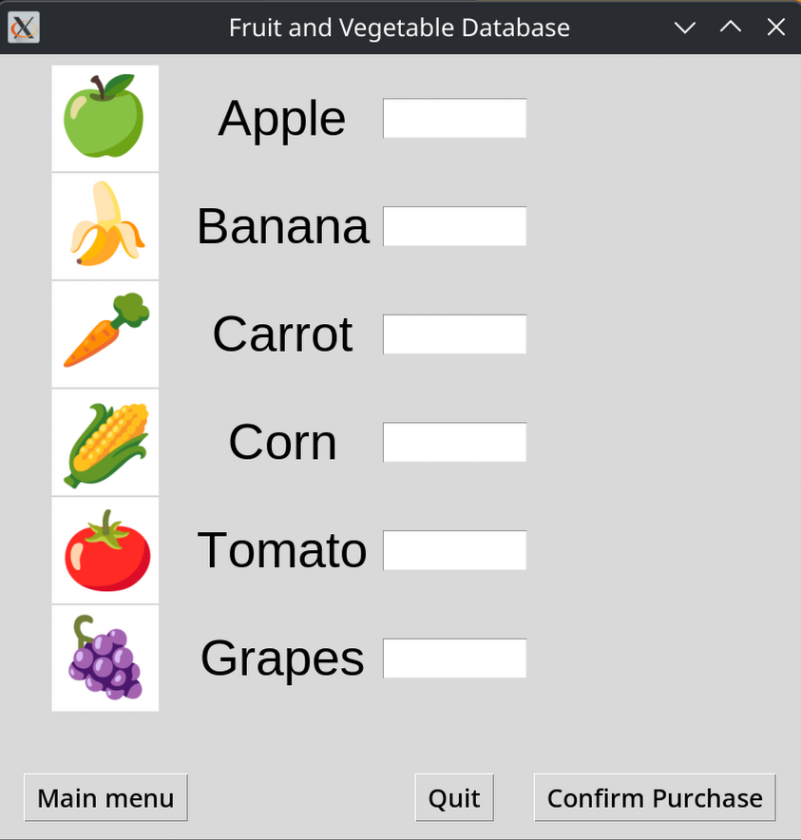
NOTE - Example only, your MVP will look different.
Requirements
Functionality:
- Display current cart contents
- Allow users to add items to the cart (calls
add_item()) - Display total items and sorted cart (calls
sort_entries()) - Simple, clean layout (MVP = minimal but functional)
- NO complex features — keep it simple
Technical Choice:
You must choose ONE GUI package and justify your choice in writing:
Package Justification (3-4 paragraphs required):
Write a brief explanation including:
- Why you chose this package (pros that matter for your project)
- Trade-offs you considered (what other options offered and why you rejected them)
- How it fits the MVP philosophy (simplicity, time to implement, maintainability)
- One limitation you encountered and how you worked around it
Submission Requirements (GUI Extension)
Files to Submit (to Blackboard):
- Code ZIP file (all source code including
shopping_cart_gui.py,dict_methods.py, etc.) - README.md (justification document with the 3-4 paragraphs)
- Screenshot (your GUI running successfully)
Submission Location:
- Blackboard: Navigate to AT1 - Weekly Python Tasks - Week 3 (GUI Extension)
- Upload the code ZIP file
- Upload the README.md file (with justification)
- Upload the screenshot image
GitHub (for version control):
- Create a GitHub repository and commit your work regularly
- Push all files including the README with justification
- This shows your development process and commit history
- Share the repo link in blackboard as a submission text
Learning Outcomes & Debugging Practice
What You're Learning:
- Dictionary Mastery - Comprehensive understanding of key-value data structures
- Multi-Function Integration - How functions work together in larger systems
- Data Transformation - Converting and organizing data for different uses
- Nested Data Structures - Working with dictionaries containing dictionaries
- Test-Driven Development - Using tests to guide implementation
- Code Quality - Writing readable, well-documented, robust code
Debugging Tips:
- Run tests frequently - Don't wait until the end
- Test edge cases - Empty dictionaries, missing keys, zero quantities
- Use print statements to see dictionary contents during execution
- Check your key names - Typos in dictionary keys are common bugs
- Verify data types - Make sure you're working with the right types (int vs str, etc.)
- Read test error messages carefully - They tell you exactly what's wrong
Additional Resources
- Exercism Python Track - More practice exercises
- Python Dictionary Documentation
- Real Python - Dictionaries
- Python Best Practices - Style guide (PEP 8)
Key Takeaways
Session Summary
By completing this session, you've practiced:
- Dictionary mastery — Understanding key-value data structures deeply
- Dictionary methods — Safe access with
.get()and.setdefault() - Iteration techniques — Working with keys, values, and items views
- Multi-function integration — How functions work together in larger systems
- Sorting and organizing — Manipulating dictionary data for different purposes
- Test-driven development — Using tests to guide your implementation
These skills will help you manage complex data structures in your robotics systems!
Next Steps
After completing this session, you'll move to Session 04, where you'll continue building your Python fundamentals with more advanced data structures and techniques.