Session 1: IDE Debugger Mastery — Binary Search Exercise
Week: 1
Duration: 4 hours
Phase: Python Warm-up & IDE Fundamentals
Image courtesy of Freepik
Session Introduction
In this session you will master your IDE's debugger by working through a hands-on binary search implementation exercise. The focus is not on understanding algorithms deeply, but on developing proficiency with debugging tools (breakpoints, step-through execution, variable inspection) that you'll rely on throughout this course. The binary search algorithm provides an ideal simple problem to practice these essential debugging skills.
Learning Objectives
By the end of this session, you will be able to:
- Set breakpoints and run code in debug mode in your IDE (VS Code, PyCharm, etc.)
- Step through code line-by-line and inspect variable values during execution
- Use watch expressions to track variable changes
- Understand why binary search is more efficient than linear search
- Implement a binary search function that passes all test cases
- Submit working code to Blackboard
Session Structure
- Unit Testing Fundamentals - Learn
assert,unittest, test file structure - IDE Debugger Fundamentals - Learn your IDE's debugging tools (breakpoints, step execution, inspectors)
- Binary Search Overview - Understand the algorithm and why it's efficient
- Exercism Exercise - Implement the binary search function using the provided starter code
- Debugging Your Solution - Use debugger to verify logic and fix bugs
- Testing & Validation - Run tests and ensure all cases pass before submission
Pre-Session Preparation
IDE & Python Setup
Ensure you have:
- Python 3.8+ installed
- Your preferred IDE: VS Code or PyCharm (both have excellent debuggers)
- Basic familiarity with your IDE (opening files, running code)
Debugger Resources (Optional Pre-Reading)
- VS Code: Debug Python in VS Code
- PyCharm: Debug Python in PyCharm
- Unit Testing Guide: See UNIT-TESTING-GUIDE.md for comprehensive guide to writing unit tests
1. Unit Testing Fundamentals
Why Testing Matters
Professional developers test their code systematically. Tests serve two critical purposes: 1. Verify correctness - Catch bugs before they reach production 2. Enable refactoring - Change code with confidence (tests catch breakage)
Tests are executable specifications of what your code should do.
Deep Dive: Writing Unit Tests
For a comprehensive guide to writing, organizing, and running unit tests in Python, see the UNIT-TESTING-GUIDE. This guide covers best practices, test organization, and advanced testing patterns you'll use throughout this course.
The Three Pillars of Testing
Pillar 1: The assert Statement
The simplest form of testing - make a claim about what your code produces:
When an assertion fails, Python raises an AssertionError:
>>> assert 1 == 2
Traceback (most recent call last):
  File "<stdin>", line 1, in <module>
AssertionError
You can add a message to explain what failed:
Pillar 2: Test Files Are Separate
Tests live in their own file, separate from your code:
project/
├── binary_search.py      # Your implementation
└── binary_search_test.py # Tests for your implementation
Why? - Keeps code and tests organized - Tests can be run independently - Makes it clear what you're testing
Pillar 3: Tests Import Your Functions
Test files import the functions they test:
# binary_search_test.py
import unittest
from binary_search import find  # Import the function to test

class BinarySearchTest(unittest.TestCase):
    def test_finds_value_in_middle(self):
        result = find([1, 3, 4, 6, 8, 9, 11], 6)
        self.assertEqual(result, 3)
The unittest Framework
Python's built-in unittest module provides a structured way to organize and run tests.
Basic Structure
import unittest
from your_module import your_function

class YourTestClass(unittest.TestCase):
    def test_something(self):
        # Arrange: Set up test data
        input_data = [1, 3, 4, 6]
        target = 3

        # Act: Call the function
        result = your_function(input_data, target)

        # Assert: Check the result
        self.assertEqual(result, 1)  # Index of 3 is 1

if __name__ == '__main__':
    unittest.main()
Key concepts:
unittest.TestCase- Base class for all testsdef test_*- Methods starting withtest_are run automaticallyself.assertEqual(a, b)- Assert thata == bunittest.main()- Runs all tests in the file
Common Assertion Methods
| Method | Purpose | Example |
|---|---|---|
assertEqual(a, b) |
Check a == b |
self.assertEqual(result, 5) |
assertNotEqual(a, b) |
Check a != b |
self.assertNotEqual(result, 0) |
assertTrue(x) |
Check x is True |
self.assertTrue(found) |
assertFalse(x) |
Check x is False |
self.assertFalse(empty) |
assertRaises(Exception, func, args) |
Check exception raised | self.assertRaises(ValueError, find, [1,2], 5) |
Testing Error Cases
The binary search exercise requires you to raise an error when the value isn't found:
# binary_search.py
def find(array, value):
    # ... search logic ...
    if not found:
        raise ValueError("value not in array")
    return index
Testing that an error is raised:
# binary_search_test.py
def test_value_not_found(self):
    with self.assertRaises(ValueError) as err:
        find([1, 3, 4, 6], 7)

    self.assertEqual(err.exception.args[0], "value not in array")
What's happening:
assertRaises()checks that the code raises the expected exceptionerr.exception.args[0]accesses the error message- Both the exception type AND message can be tested
Running Tests
Run all tests in a file:
Run with verbose output:
Output (all pass):
test_finds_a_value_at_the_beginning_of_an_array ... ok
test_finds_a_value_at_the_end_of_an_array ... ok
test_finds_a_value_in_the_middle_of_an_array ... ok
test_identifies_that_a_value_is_not_included ... ok
test_nothing_is_found_in_an_empty_array ... ok

OK (23 tests in 0.002s)
Output (some fail):
test_finds_a_value_in_the_middle_of_an_array ... FAIL
test_identifies_that_a_value_is_not_included ... ERROR

FAIL: test_finds_a_value_in_the_middle_of_an_array
AssertionError: None != 3

ERROR: test_identifies_that_a_value_is_not_included
ValueError: value not in array

FAILED (23 tests, 1 failure, 1 error in 0.234s)
When tests fail, the output tells you exactly which test failed and why.
Testing in Your IDE
Instead of running tests from the command line, your IDE provides visual test runners that are much faster to use during development.
VS Code Test Explorer
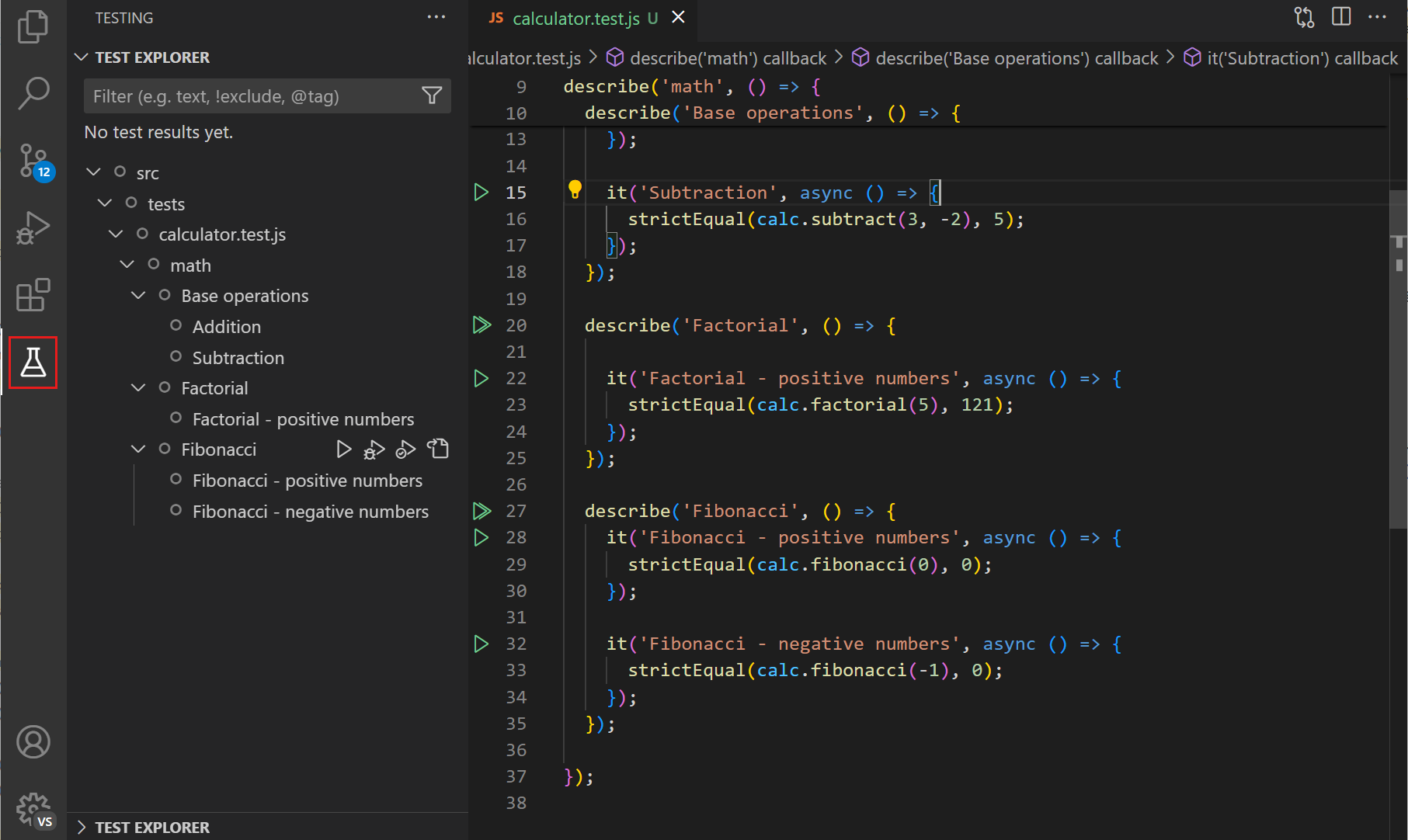
VS Code has a built-in Test Explorer that integrates directly with your unittest files:
- Install the Python extension (if not already installed)
- Open the Test Explorer panel - Click the beaker icon in the left sidebar
- Run tests directly - Right-click on a test file or individual test and select "Run Test"
- View results visually - Green checkmarks for passing tests, red X for failures
- Debug tests - Right-click and select "Debug Test" to step through with breakpoints
Benefits:
- ✅ Quick one-click test execution
- ✅ Visual pass/fail indicators
- ✅ Easy integration with debugging
- ✅ Detailed error output in the IDE
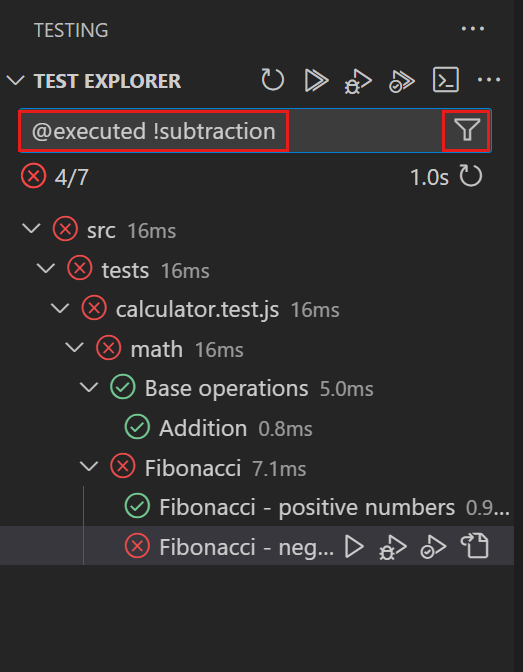
See VS Code Python Testing Documentation for more details.
PyCharm Test Runner
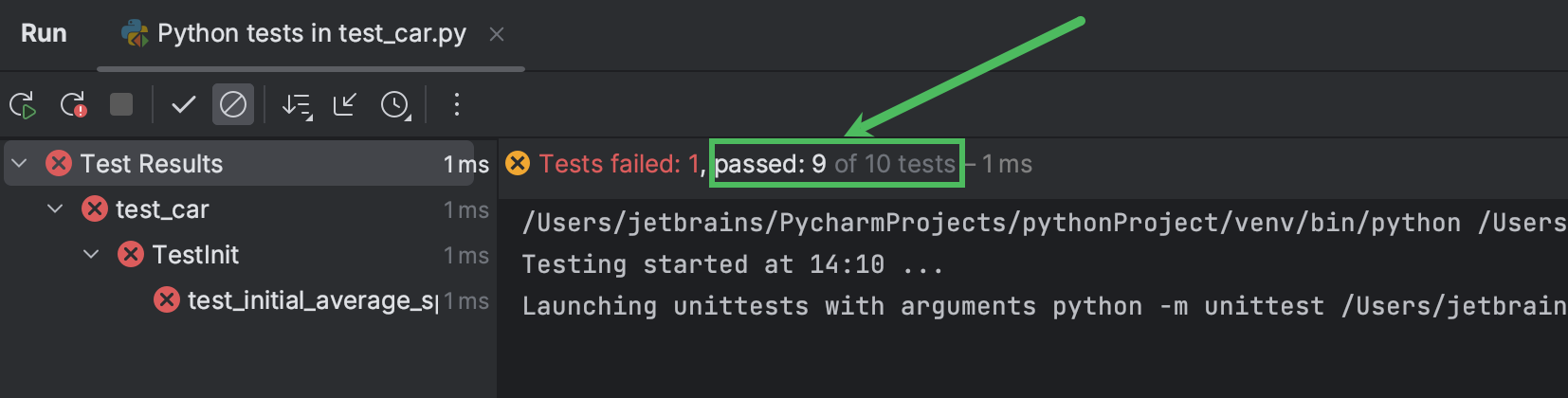
PyCharm's test runner is integrated into the editor and makes running tests effortless:
- Right-click on a test file in the file explorer
- Select "Run 'Unittests in [filename]'"
- Or click the green play icon next to the file name
- View results in the Run panel with detailed information about failures
Features:
- ✅ Run individual tests or entire test suites
- ✅ Click on failed tests to jump to the error
- ✅ Re-run failed tests only
- ✅ Easy debugging from the test runner
See PyCharm Testing Documentation for more details.
We will demonstrate both of these in class, so you can see them in action.
Real Example: Binary Search Tests
The Exercism binary search exercise provides comprehensive tests covering:
def test_finds_a_value_in_an_array_with_one_element(self):
    self.assertEqual(find([6], 6), 0)

def test_finds_a_value_in_the_middle_of_an_array(self):
    self.assertEqual(find([1, 3, 4, 6, 8, 9, 11], 6), 3)

def test_finds_a_value_at_the_beginning_of_an_array(self):
    self.assertEqual(find([1, 3, 4, 6, 8, 9, 11], 1), 0)

def test_finds_a_value_at_the_end_of_an_array(self):
    self.assertEqual(find([1, 3, 4, 6, 8, 9, 11], 11), 6)

def test_identifies_that_a_value_is_not_included_in_the_array(self):
    with self.assertRaises(ValueError) as err:
        find([1, 3, 4, 6, 8, 9, 11], 7)
    self.assertEqual(err.exception.args[0], "value not in array")

def test_nothing_is_found_in_an_empty_array(self):
    with self.assertRaises(ValueError) as err:
        find([], 1)
    self.assertEqual(err.exception.args[0], "value not in array")
These tests verify:
- ✅ Single element arrays
- ✅ Middle of array
- ✅ Beginning and end of array
- ✅ Odd and even length arrays
- ✅ Value not found (error case)
- ✅ Empty array
- ✅ Out of bounds values
Video Resources
- CS50 Python Testing Week (Week 5) - Harvard's comprehensive guide to testing fundamentals
- Python Unit Testing Basics - Practical introduction to unit testing
2. IDE Debugger Mastery
Why Learn Debugging Alongside Testing
Your IDE's debugger is your most powerful tool for understanding why tests fail. When a test fails, the debugger helps you step through your code to see exactly where it went wrong.
3. Understanding Binary Search (Quick Overview)
What is Binary Search?
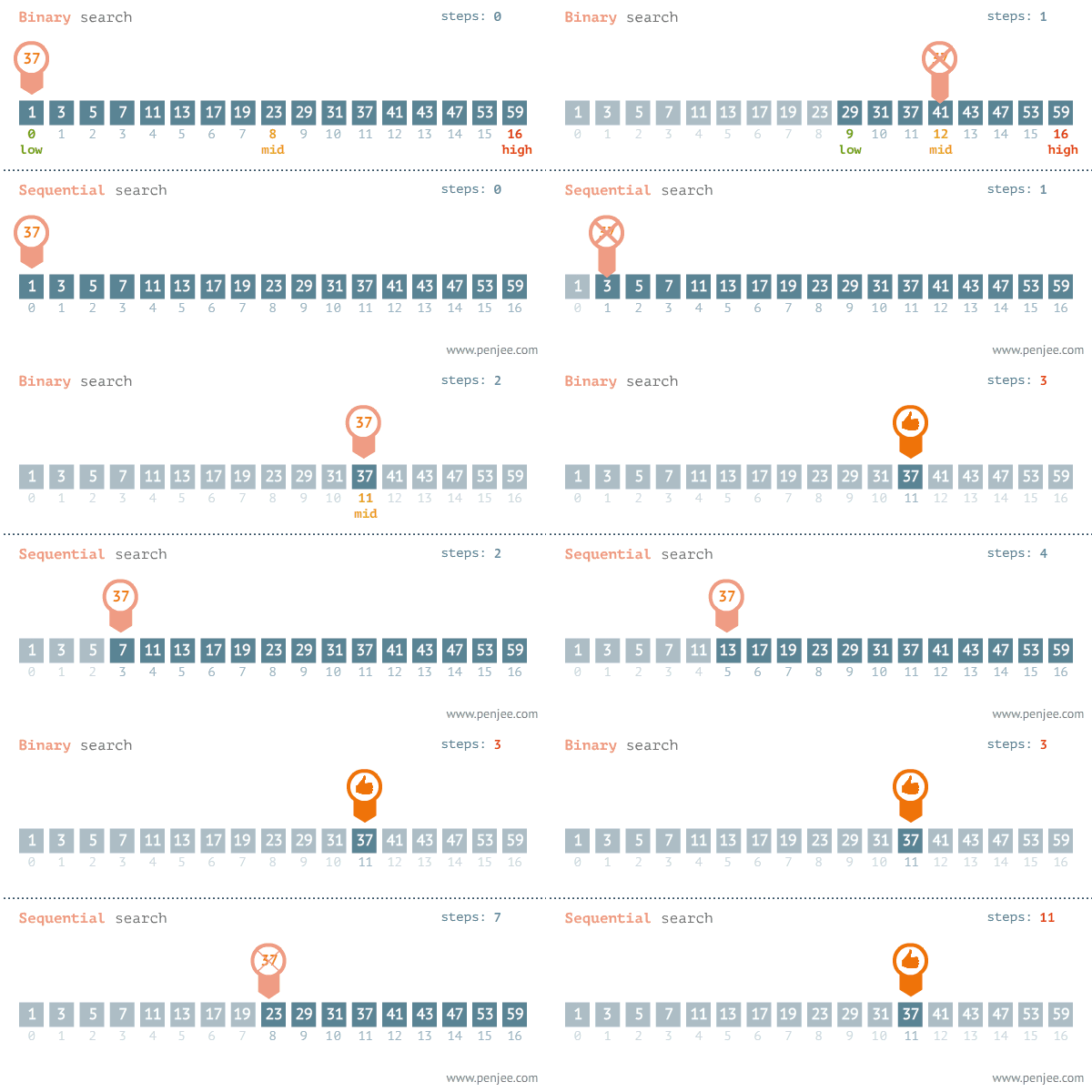
Binary search is an algorithm for finding a target value in a sorted array by repeatedly dividing the search space in half:
- Start with the middle element
- If it matches the target → Found!
- If the target is smaller → Search the left half
- If the target is larger → Search the right half
- Repeat until found or no elements remain
Why It's Efficient
Time Complexity Comparison:
- Linear search: O(n) — Check every element
- Binary search: O(log n) — Much faster
Real Example: Searching for a number in a sorted list of 1 million items:
- Linear search: up to 1,000,000 comparisons
- Binary search: up to ~20 comparisons
Key Requirement: The array must be sorted for binary search to work!
Performance Demonstration (Run This!)
The small example above doesn't show WHY binary search matters. Let's test with 1 million elements to see the real difference:
import time

# Create a sorted list of 1 million numbers
large_list = list(range(0, 1_000_000, 1))
target = 999_999  # Search for the last element (worst case)

# Method 1: Python's "in" keyword (linear search)
start = time.time()
found = target in large_list
time_in = time.time() - start
print(f"Python 'in' keyword: {time_in:.6f} seconds")

# Method 2: Manual linear search
def linear_search(arr, target):
    for i, val in enumerate(arr):
        if val == target:
            return i
    return -1

start = time.time()
found = linear_search(large_list, target)
time_linear = time.time() - start
print(f"Manual linear search: {time_linear:.6f} seconds")

# Method 3: Binary search
def binary_search(arr, target):
    left, right = 0, len(arr) - 1
    while left <= right:
        mid = (left + right) // 2
        if arr[mid] == target:
            return mid
        elif arr[mid] < target:
            left = mid + 1
        else:
            right = mid - 1
    return -1

start = time.time()
found = binary_search(large_list, target)
time_binary = time.time() - start
print(f"Binary search: {time_binary:.6f} seconds")

# Show the speedup
print(f"\nBinary search is {time_linear / time_binary:.0f}x faster than linear search!")
Expected output (approximate):
Python 'in' keyword: 0.035000 seconds
Manual linear search: 0.040000 seconds
Binary search: 0.000001 seconds

Binary search is 35000x faster than linear search!
Key insights:
- Python's
inkeyword is just a linear search under the hood - On 1 million elements, binary search is thousands of times faster
- This difference grows exponentially with array size
- For 1 billion elements, the speedup would be even more dramatic
Why Learn Debugging First
Before you can effectively write code, you need to understand how to debug it. When tests fail, your debugger helps you understand exactly why. Professional developers spend far more time debugging than writing.
Essential Debugger Skills for This Exercise
Setting Breakpoints
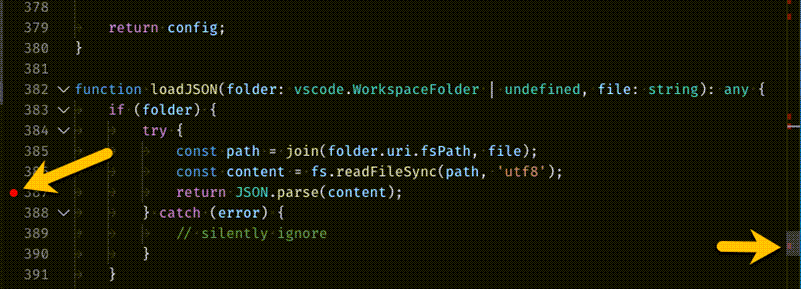
- VS Code: Click in the left margin next to a line number
- PyCharm: Click in the left margin next to a line number
- A red dot appears; code will pause when execution reaches that line
Stepping Through Code
- Step Over (
F10): Execute the current line, skip into function calls - Step Into (
F11): Execute the current line, jump into function calls - Step Out (
Shift+F11): Complete the current function and return
Inspecting Variables
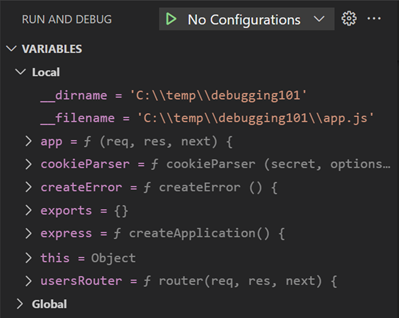
- Locals Panel: Shows all variables in current scope with their current values
- Watch Expressions: Add specific variables to monitor their changes
- Hover Over Variables: In VS Code, hover over a variable name to see its value
Common Debugging Workflow
- 1. Set a breakpoint where you suspect a problem
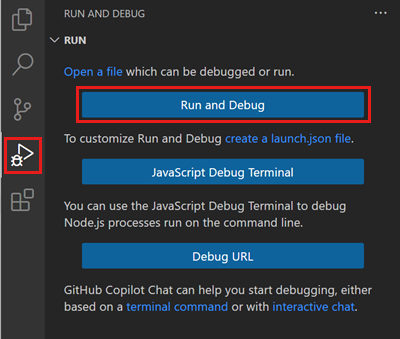
- Run in debug mode (not regular run)
- Step through line-by-line

- Watch variable values change
- Identify the logic error
- Fix and repeat
Practice Setup (Do This Now!)
-
Create a simple test file:
def add(a, b): result = a + b return result
print(add(5, 3))
-
Set a breakpoint on the
result =line - Run in debug mode and step through
- Hover over
a,b, andresultto see their values - Continue stepping until the function completes
This is your warm-up before tackling binary search!
4. The Exercise: Implement Binary Search
About This Exercise
This exercise comes from Exercism, a free coding platform with well-designed practice problems. Your task is to implement a binary search function that finds a value in a sorted array.
The Task
Implement a binary_search() function with these requirements:
- Input: A sorted array and a target value
- Output: The index (position) of the target in the array
- Error handling: Raise a
ValueErrorwith message"value not in array"if the target is not found
Example Walkthrough
Looking for 23 in [4, 8, 12, 16, 23, 28, 32]:
- Compare
23with middle element16 - Since
23 > 16, eliminate left half →[23, 28, 32] - Compare
23with new middle element28 - Since
23 < 28, eliminate right half →[23] - Found at index 4 → return
4
Getting the Starter Code
Download or view the exercise files from:
You need:
- The problem description (on that page)
- The starter template file
binary_search.py - The test file to verify your solution works
Note
You'll implement your solution locally in your IDE, not on the Exercism platform. We'll use Exercism's problem description and tests as our guide.
5. Debugging Your Binary Search Solution
The Debugging Workflow for This Exercise
Step 1: Create Your Function
Start with a basic implementation in binary_search.py:
''' python
def binary_search(array, target):
"""Find target in sorted array, return its index."""
# Your implementation here
pass
'''
Step 2: Set Strategic Breakpoints
Place breakpoints at:
- The start of the function (before the loop)
- Inside your loop (to watch each iteration)
- Before returning a result
Step 3: Debug with Test Data
Run the test file in debug mode. When execution pauses at a breakpoint:
- Check that
arrayandtargethave the correct values - Watch how
left,right, andmidchange each iteration - Verify your comparison logic (
<,>,==) - Confirm the return value before exiting
Step 4: Common Bugs to Catch with the Debugger
| Bug | How to Spot with Debugger |
|---|---|
| Off-by-one error in mid calculation | Watch left, right, mid values in each iteration |
| Infinite loop | Step through and see if left/right update correctly |
| Returning wrong index | Check value at return point before function exits |
| Wrong comparison operators | Step through and see which branch executes |
Testing Your Solution
Once your implementation looks good, run the test file:
python test_binary_search.py
Or use Visual Studio or Pycharm's builtin testing.
All tests should pass. If any fail:
- Read the failure message carefully
- Set breakpoints in the failing test case
- Debug step-by-step to understand why it failed
- Fix the code
- Repeat until all pass
6. Submission to Blackboard
Submission Requirements
Files to Submit:
- Your solution file:
binary_search.py(with your implementation) - Completed submission template document with screenshot showing all tests passing locally
Submission Location:
- Navigate to Blackboard → AT1 - Weekly Python Tasks - Week 1
- Upload both files to the submission folder
- Ensure all tests pass before submitting
Additional Resources
Debugger Documentation
- VS Code Python Debugging: Official VS Code Docs
- PyCharm Debugger Guide: JetBrains Official Docs
Binary Search Deeper Dive (Optional)
If you want to explore further:
- Wikipedia Binary Search: Comprehensive algorithm explanation
- Try Other Sorting Exercises: Once done with binary search, explore bubble sort, selection sort, or other Exercism exercises
- Complexity Analysis: Write a program to measure the performance difference between linear and binary search on large datasets
Troubleshooting
Common Issues
| Problem | Solution |
|---|---|
| Function not found error | Ensure function name is exactly binary_search (case-sensitive) |
| Test file can't find your function | Check file name is binary_search.py and in correct directory |
| ValueError not being raised | Verify you're using raise ValueError("value not in array") |
| Infinite loop in debugger | Step through and check that left/right bounds are updating |
| Off-by-one errors | Use debugger to watch mid calculation: (left + right) // 2 |
Key Takeaways
Session Summary
By completing this session, you've practiced:
- Using your IDE's debugger — The most important skill for any programmer
- Stepping through code execution — Understanding exactly what your code does
- Inspecting runtime values — Verifying your logic works as intended
- Implementing a classic algorithm — Understanding binary search efficiency
These debugging skills will be essential as you tackle more complex robotics systems later in the course!
Next Steps
After completing this session, you'll move to Session 02, where you'll begin working with object-oriented programming fundamentals applied to robotics systems.